
These values were collected by running the wolfCrypt benchmark application on an Alpha Project board (AP-RX71M-0A)
wolfCrypt Benchmark (block bytes 1024, min 1.0 sec each)
RNG                775 KB took 1.031 seconds,  751.916 KB/s
AES-128-CBC-enc      2 MB took 1.006 seconds,    1.505 MB/s
AES-128-CBC-dec      1 MB took 1.010 seconds,    1.450 MB/s
AES-192-CBC-enc      1 MB took 1.010 seconds,    1.378 MB/s
AES-192-CBC-dec      1 MB took 1.011 seconds,    1.328 MB/s
AES-256-CBC-enc      1 MB took 1.019 seconds,    1.270 MB/s
AES-256-CBC-dec      1 MB took 1.014 seconds,    1.227 MB/s
AES-128-GCM-enc    675 KB took 1.025 seconds,  658.858 KB/s
AES-128-GCM-dec    675 KB took 1.026 seconds,  658.087 KB/s
AES-192-GCM-enc    650 KB took 1.027 seconds,  633.220 KB/s
AES-192-GCM-dec    650 KB took 1.028 seconds,  632.603 KB/s
AES-256-GCM-enc    625 KB took 1.025 seconds,  609.697 KB/s
AES-256-GCM-dec    625 KB took 1.026 seconds,  609.102 KB/s
RABBIT               9 MB took 1.001 seconds,    8.534 MB/s
3DES               475 KB took 1.035 seconds,  458.893 KB/s
MD5                 13 MB took 1.001 seconds,   13.275 MB/s
SHA                  5 MB took 1.002 seconds,    4.778 MB/s
SHA-256              2 MB took 1.006 seconds,    1.650 MB/s
SHA-384            675 KB took 1.034 seconds,  653.057 KB/s
SHA-512            675 KB took 1.034 seconds,  652.994 KB/s
HMAC-MD5            13 MB took 1.001 seconds,   13.142 MB/s
HMAC-SHA             5 MB took 1.004 seconds,    4.768 MB/s
HMAC-SHA256          2 MB took 1.014 seconds,    1.638 MB/s
HMAC-SHA384        650 KB took 1.010 seconds,  643.437 KB/s
HMAC-SHA512        650 KB took 1.011 seconds,  643.182 KB/s
RSA     2048 public         26 ops took 1.067 sec, avg 41.038 ms, 24.367 ops/sec
RSA     2048 private         2 ops took 1.157 sec, avg 578.500 ms, 1.729 ops/sec
DH      2048 key gen         6 ops took 1.049 sec, avg 174.883 ms, 5.718 ops/sec
DH      2048 agree           6 ops took 1.191 sec, avg 198.433 ms, 5.039 ops/sec
ECC      256 key gen         7 ops took 1.162 sec, avg 165.943 ms, 6.026 ops/sec
ECDHE    256 agree           8 ops took 1.323 sec, avg 165.325 ms, 6.049 ops/sec
ECDSA    256 sign            6 ops took 1.044 sec, avg 174.017 ms, 5.747 ops/sec
ECDSA    256 verify          4 ops took 1.281 sec, avg 320.300 ms, 3.122 ops/sec
CURVE  25519 key gen         5 ops took 1.137 sec, avg 227.300 ms, 4.399 ops/sec
CURVE  25519 agree           6 ops took 1.366 sec, avg 227.583 ms, 4.394 ops/sec
ED     25519 key gen       198 ops took 1.003 sec, avg 5.064 ms, 197.467 ops/sec
ED     25519 sign          146 ops took 1.005 sec, avg 6.885 ms, 145.245 ops/sec
ED     25519 verify         62 ops took 1.001 sec, avg 16.147 ms, 61.932 ops/sec
More information on using wolfSSL in combination with Renesas and wolfSSL’s support for Renesas can be found here: https://www.wolfssl.com/docs/renesas/
Return to top of page
Benchmarks using Renesas DK-S7G2 board (ThreadX + NetX) and wolfSSL 4.3.0 :
3X speed up with SHA256 operations, 1.5X speed up with AES, and over 4X speed up of public key operations when SP math was enabled.
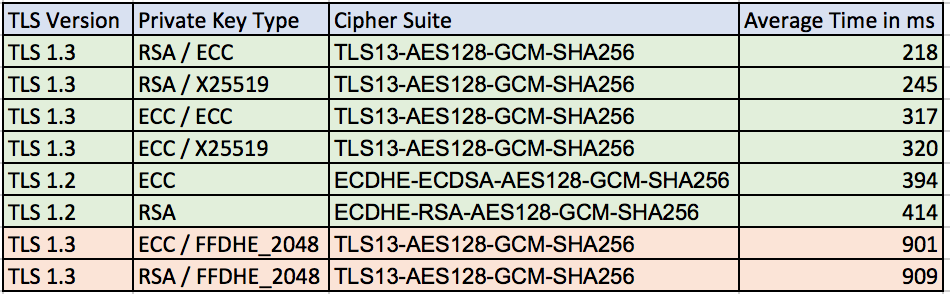
Average TLS client connection times on the board with hardware acceleration and SP math :
Software only speeds without SP math library:
AES-128-CBC-enc      2 MB took 1.010 seconds,    1.910 MB/s
SHA-256              4 MB took 1.000 seconds,    3.638 MB/s
HMAC-SHA256          4 MB took 1.010 seconds,    3.626 MB/s
RSA     2048 public         24 ops took 1.080 sec, avg 45.000 ms, 22.222 ops/sec
RSA     2048 private         2 ops took 1.840 sec, avg 920.000 ms, 1.087 ops/sec
ECC      256 key gen         3 ops took 1.170 sec, avg 390.000 ms, 2.564 ops/sec
ECDHE    256 agree           4 ops took 1.560 sec, avg 390.000 ms, 2.564 ops/sec
ECDSA    256 sign            4 ops took 1.570 sec, avg 392.500 ms, 2.548 ops/sec
ECDSA    256 verify          2 ops took 1.560 sec, avg 780.000 ms, 1.282 ops/sec
Hardware acceleration on plus use of SP math enabled:
AES-128-CBC-enc      3 MB took 1.010 seconds,    2.901 MB/s
SHA-256             11 MB took 1.000 seconds,   11.353 MB/s
HMAC-SHA256         11 MB took 1.000 seconds,   11.206 MB/s
RSA     2048 public         94 ops took 1.010 sec, avg 10.745 ms, 93.069 ops/sec
RSA     2048 private         4 ops took 1.530 sec, avg 382.500 ms, 2.614 ops/sec
ECC      256 key gen       129 ops took 1.000 sec, avg 7.752 ms, 129.000 ops/sec
ECDHE    256 agree          32 ops took 1.040 sec, avg 32.500 ms, 30.769 ops/sec
ECDSA    256 sign           90 ops took 1.000 sec, avg 11.111 ms, 90.000 ops/sec
ECDSA    256 verify         26 ops took 1.030 sec, avg 39.615 ms, 25.243 ops/sec
Time for Ed25519 and Curve25519:
CURVE  25519 key gen        36 ops took 1.020 sec, avg 28.333 ms, 35.294 ops/sec
CURVE  25519 agree          36 ops took 1.010 sec, avg 28.056 ms, 35.644 ops/sec
ED     25519 key gen        99 ops took 1.000 sec, avg 10.101 ms, 99.000 ops/sec
ED     25519 sign           82 ops took 1.000 sec, avg 12.195 ms, 82.000 ops/sec
ED     25519 verify         32 ops took 1.010 sec, avg 31.562 ms, 31.683 ops/sec
More information on using wolfSSL in combination with Renesas and wolfSSL’s support for Renesas can be found here: https://www.wolfssl.com/docs/renesas/
Return to top of page
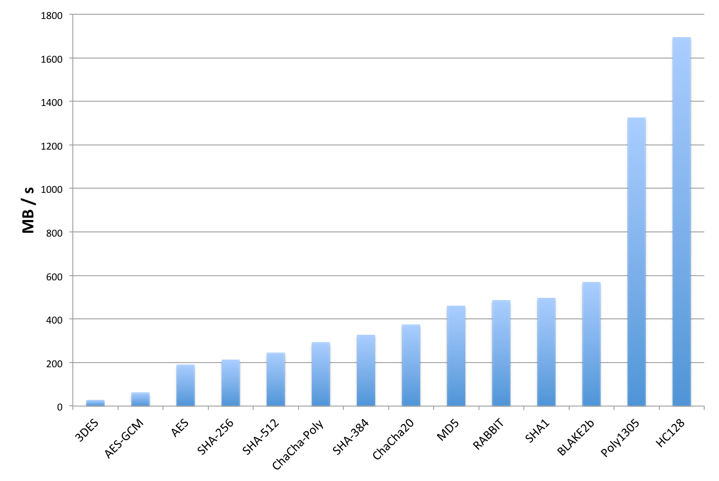
 wolfSSL only:
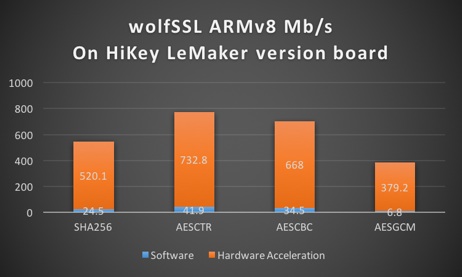
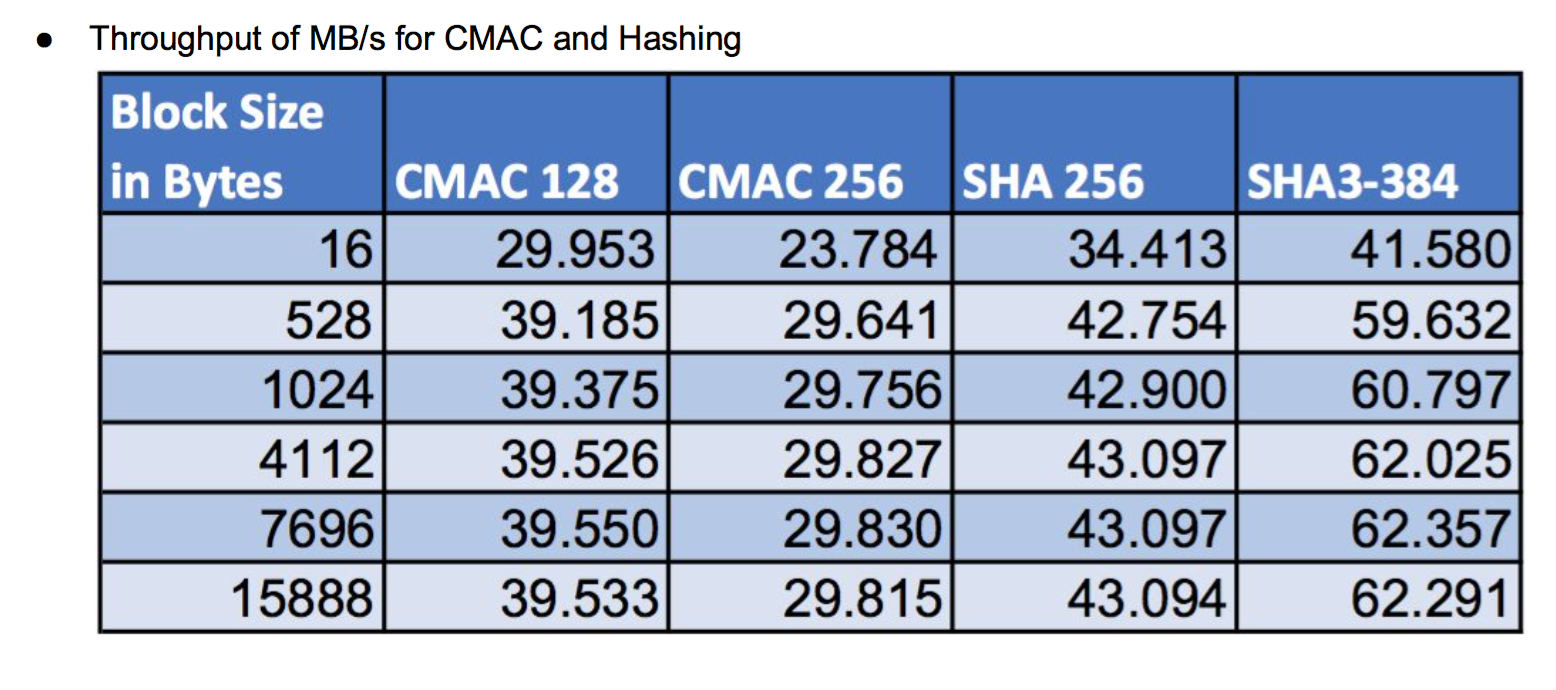 wolfSSL and ARMv8: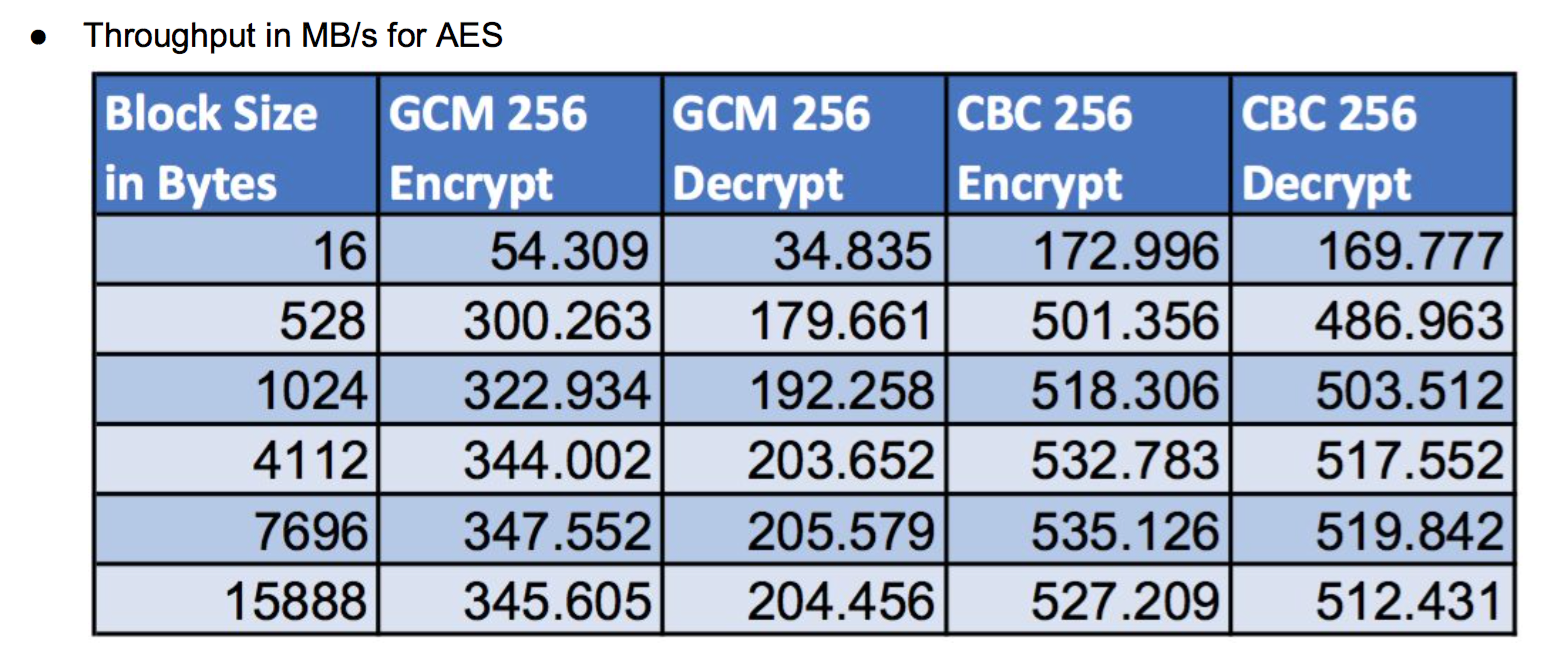
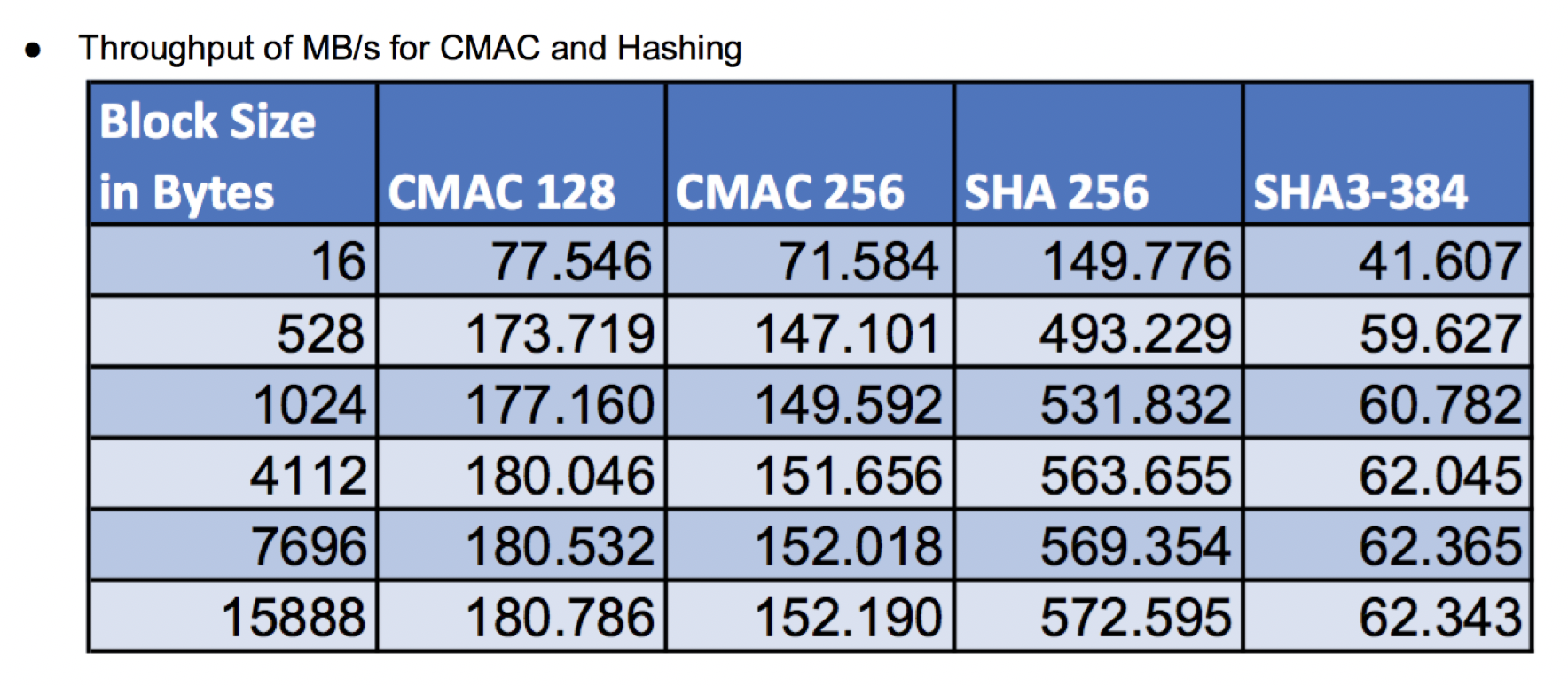
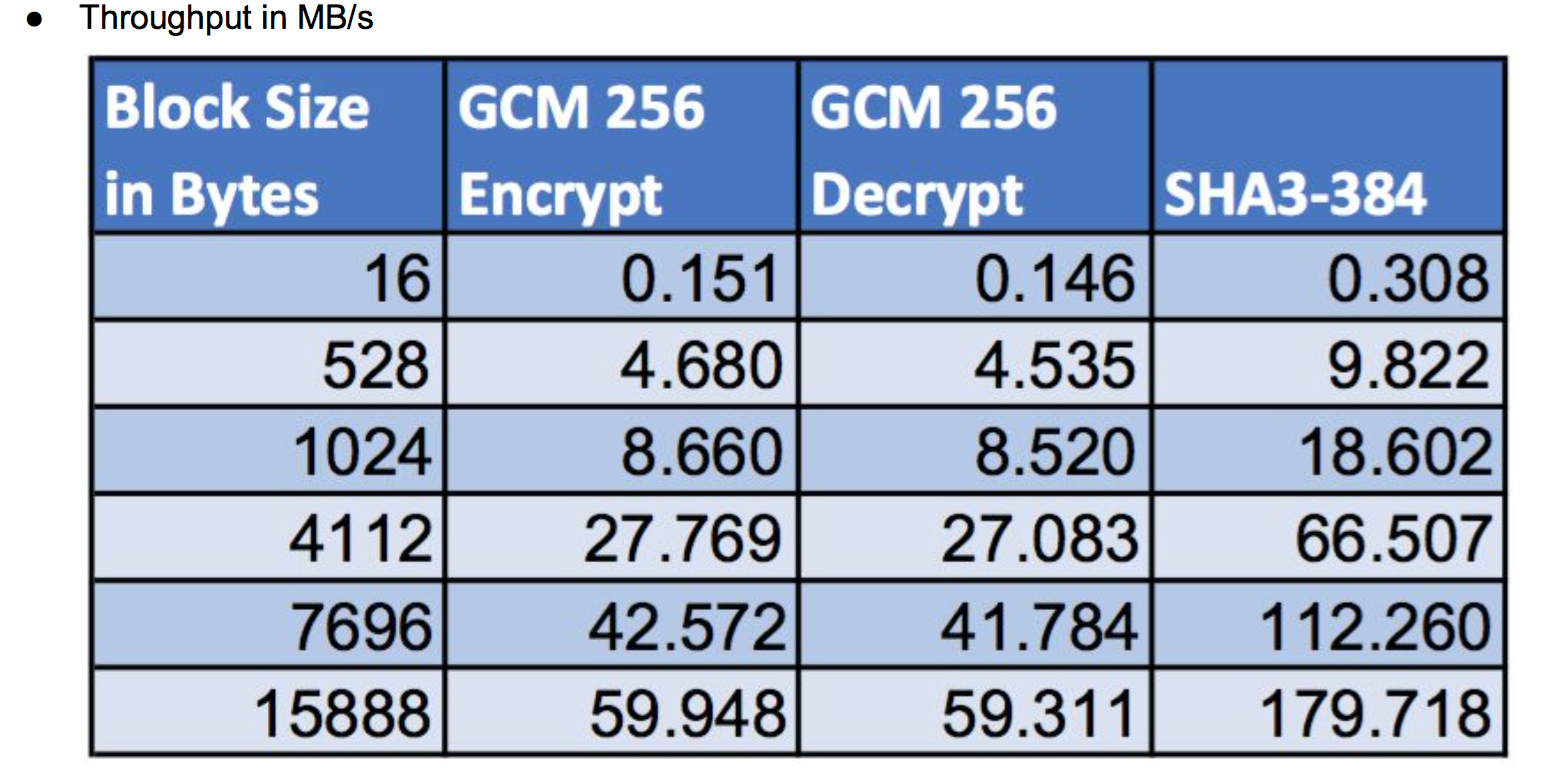 Return to
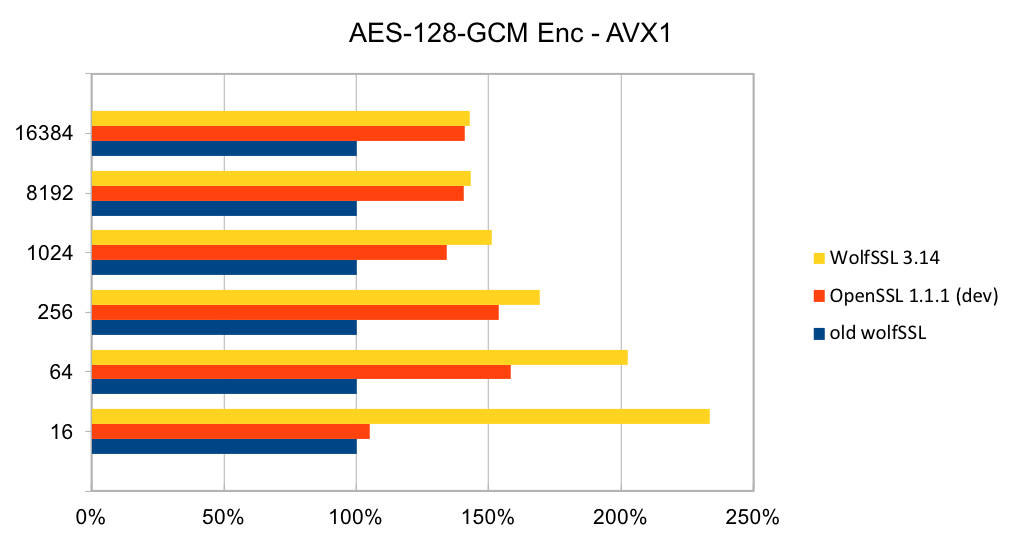
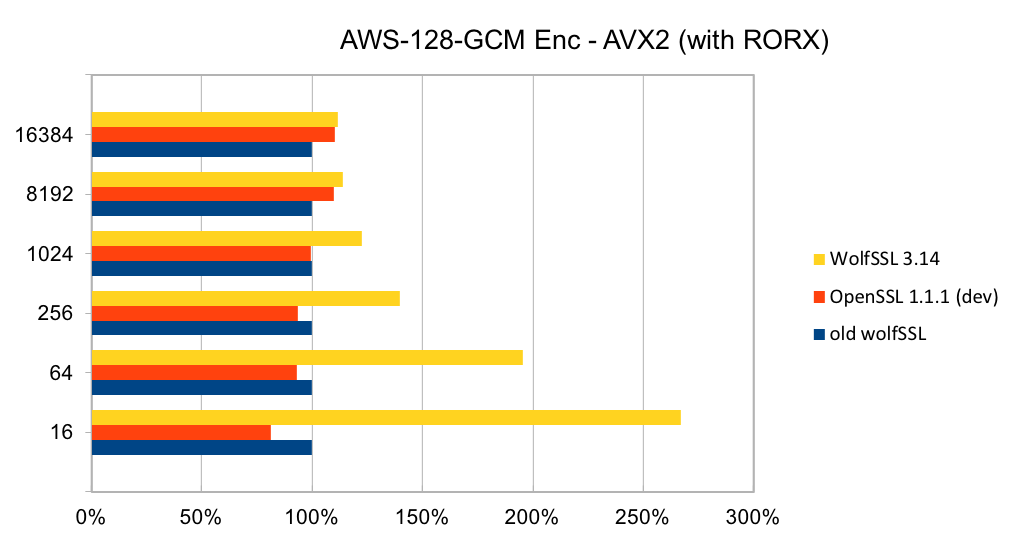
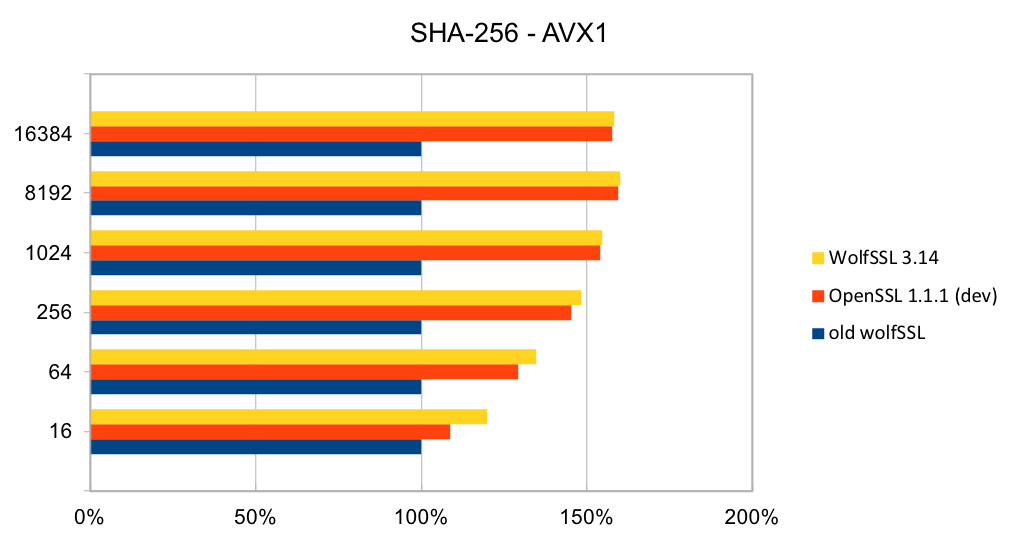
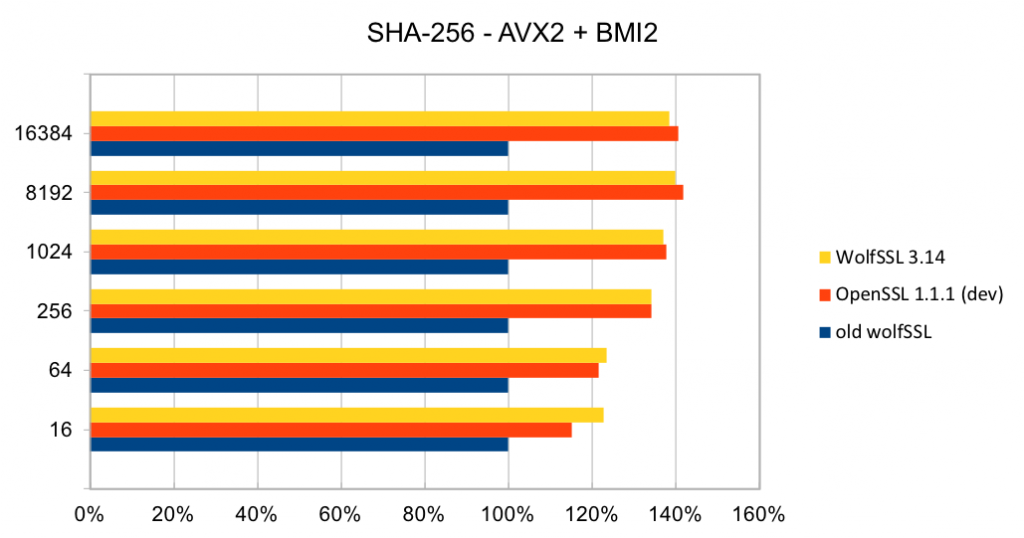
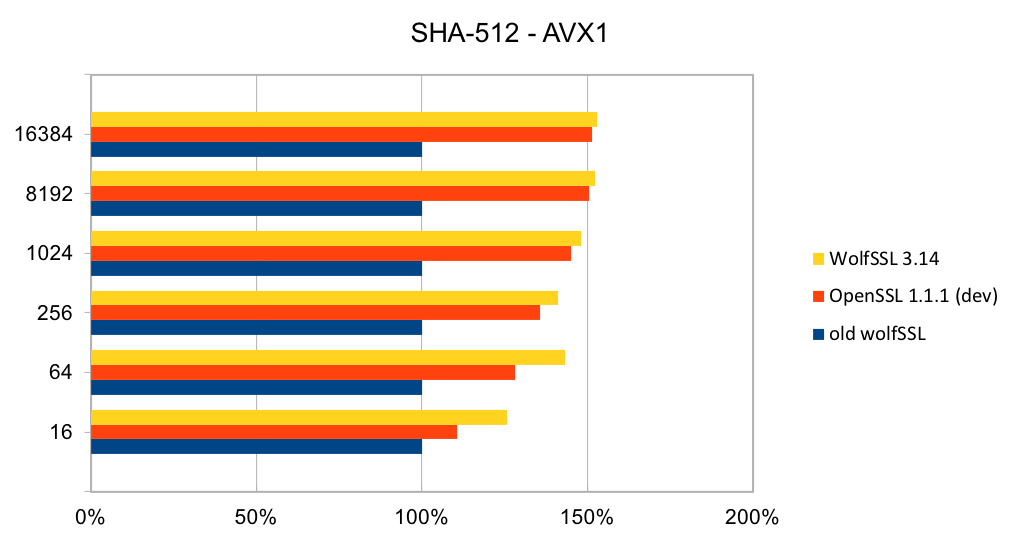
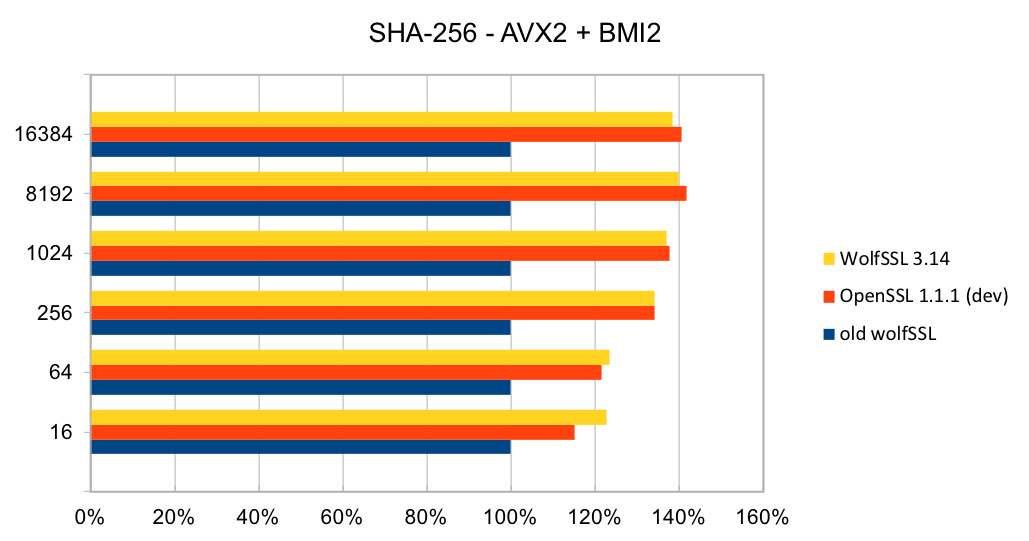
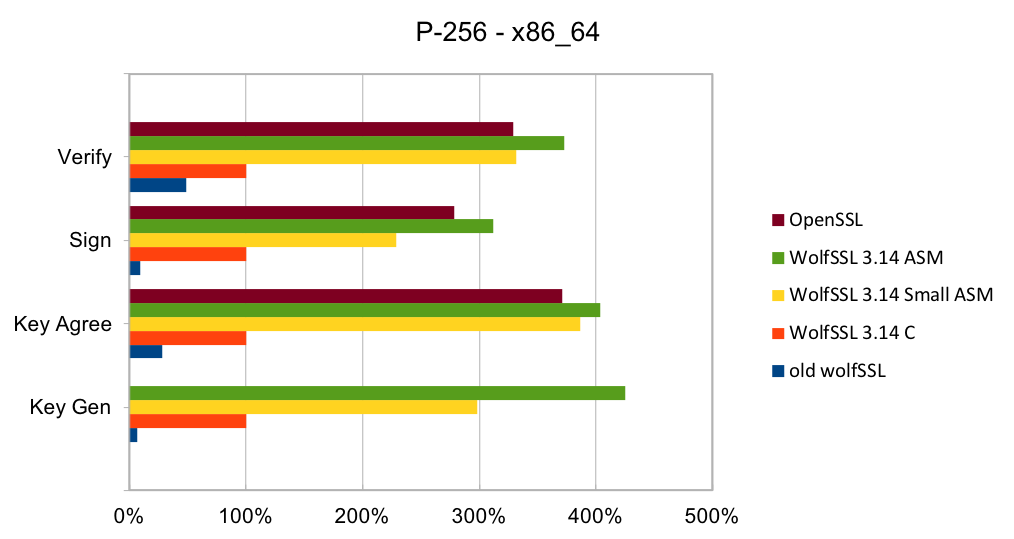
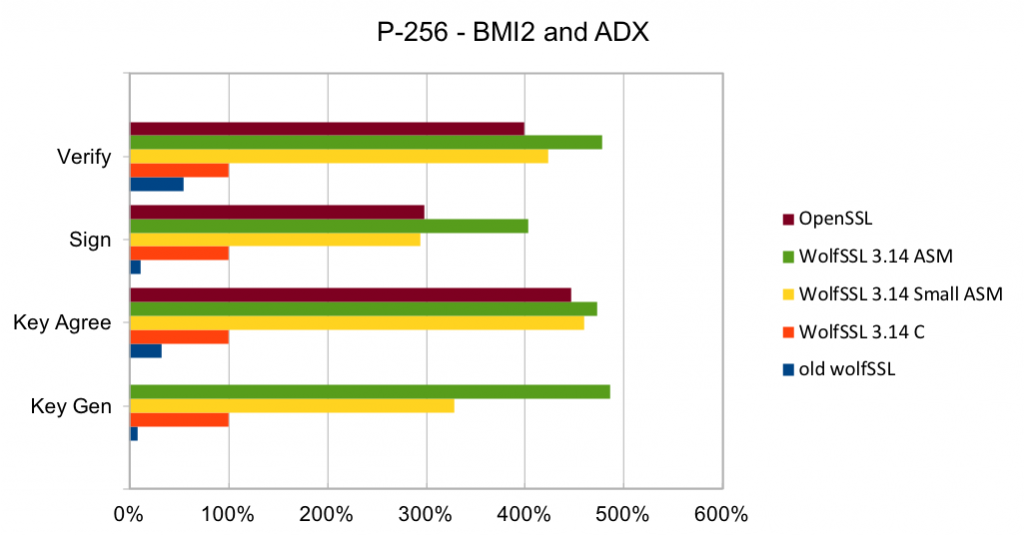
 Recent releases of wolfSSL have included new assembly code targeted at the Intel x86_64 platform. Large performance gains have been made, and the first two graphs pertain to performance increases with AES-GCM.In the graphs for these benchmarks, the Y-axis signifies block size, while the X-axis signifies relative speed to the prior version of wolfSSL.
The assembly code for AES-GCM has been rewritten to take best advantage of the AVX1 and AVX2 instructions. The performance of AES-GCM is now as good or better than OpenSSL.
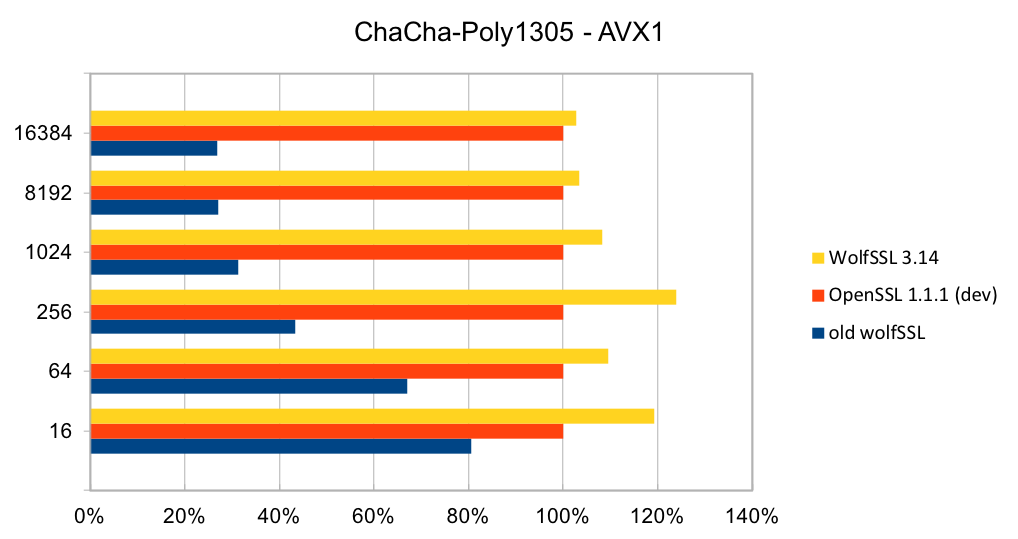
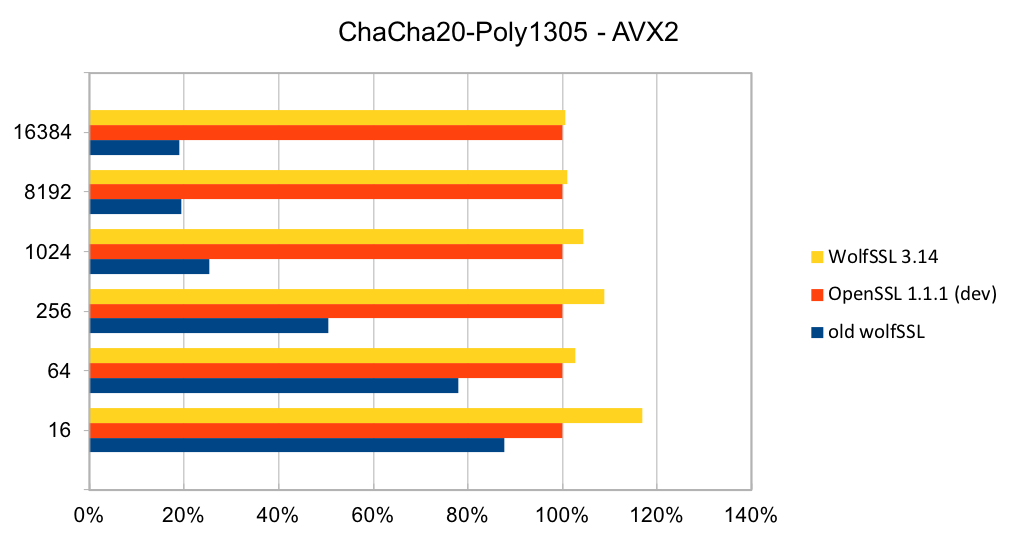
ChaCha20-Poly1305 is a relatively new authenticated encryption algorithm. It was designed as an alternative to AES-GCM. The algorithm is simple and fast on CPUs that do not have hardware acceleration for AES and GCM.
The most commonly used digest algorithms are SHA-256 and SHA-384. With the introduction of AES-GCM in TLS, SHA-256 and SHA-384 are less commonly used for application data authentication. But, they are still used for handshake message authentication, as a one-way function (as required in a pseudo-random number generator) and digital signatures.
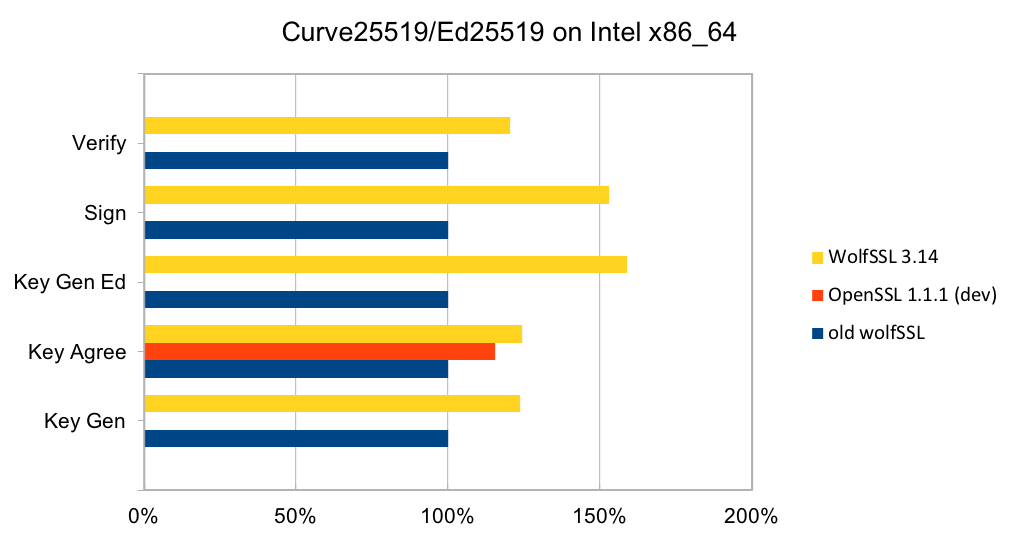
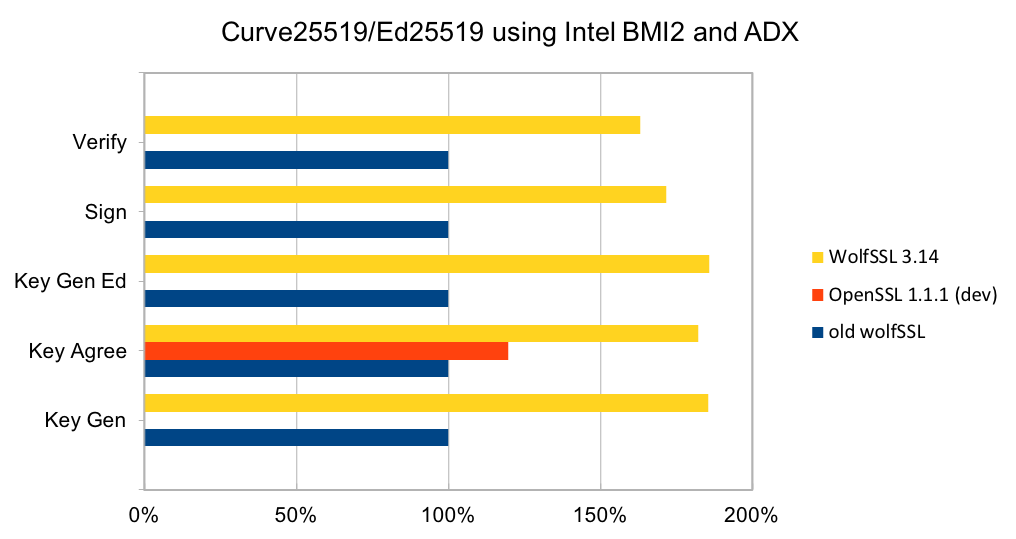
Curve25519 is set of parameters for a Montgomery elliptic curve and has ~128-bit security. It is used in key exchange and has become popular due to its speed and inclusion in standards. The algorithm is included as part of TLS v1.3 and NIST is considering it as part of SP 800-186. Ed25519 is set of parameters for a Twisted Edwards curve and is mathematically related to Curve25519 and has the same security properties. A new signature scheme has been designed over Twisted Edwards curves that is fast and included as part of TLS v1.3. A draft specification has been written describing digital certificates using EdDSA with Ed25519.
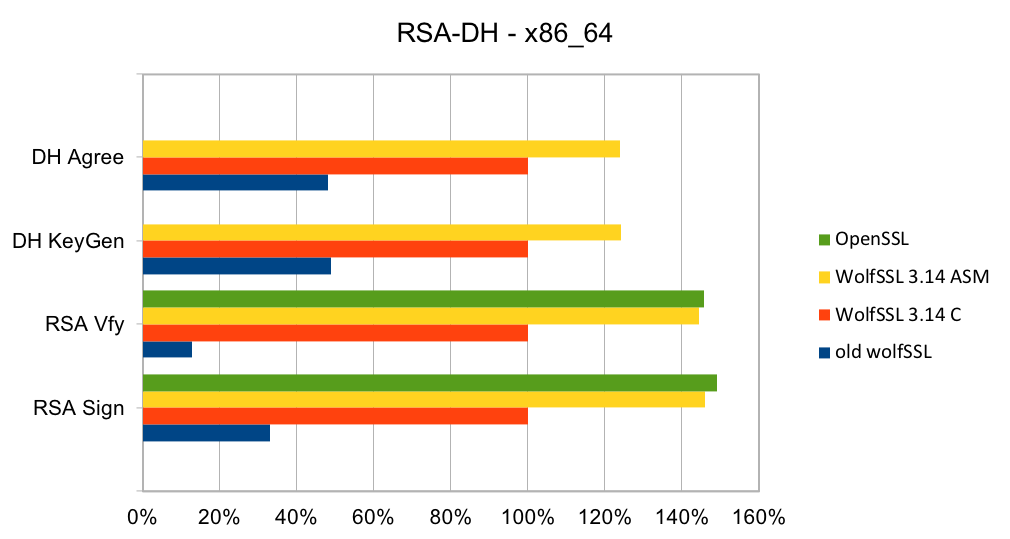
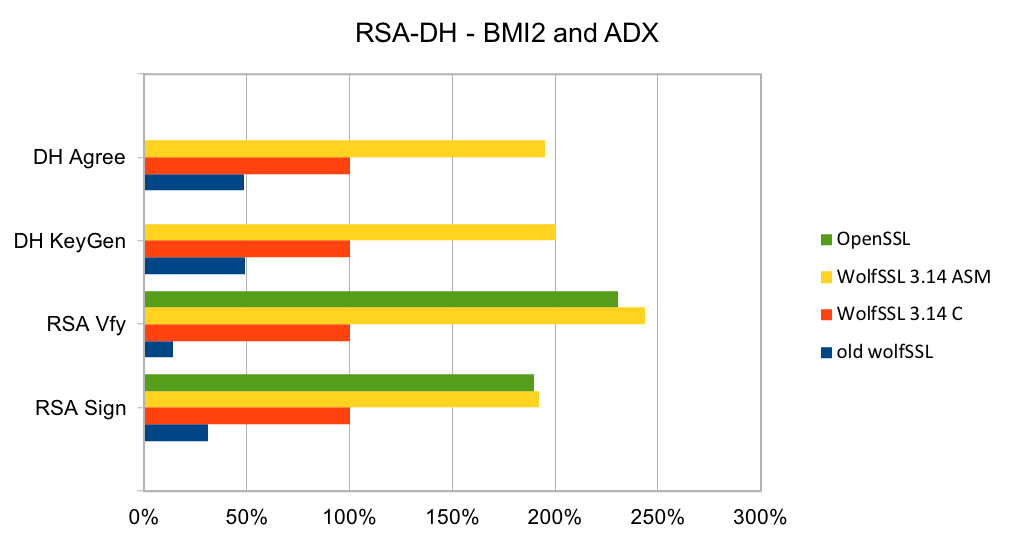
RSA is the most commonly used public key algorithm for certificates. When performing a TLS handshake, the server will sign a hash of the messages seen so far and the client will verify the signature of certificates in the certificate chain and verify the hash of messages with the public key in the certificate. Signing and verifying are the most time-consuming operations in a handshake.
DH has been the key exchange algorithm of choice in handshakes but is falling out of favor as the Elliptic Curve variants are considerably faster at the same security level. Performing the key exchange is the second most time-consuming operation in a TLS handshake.
Elliptic curve cryptography (ECC) is the alternative to finite field (FF) cryptography which has algorithms like RSA, DSA and DH. ECDSA is the elliptic curve variant of RSA and DSA while ECDH is the elliptic curve variant of DH. ECDSA and ECDH can be used anywhere their FF counterparts can be used. ECC requires a pre-defined curve to perform the operations on. The most commonly used curve is P-256 as it has 128-bit strength and is in many standards including TLS, for certificates in IETF, and NIST’s FIPS 186-4. Browsers and web servers are preferring ECDH over DH as it is much faster.
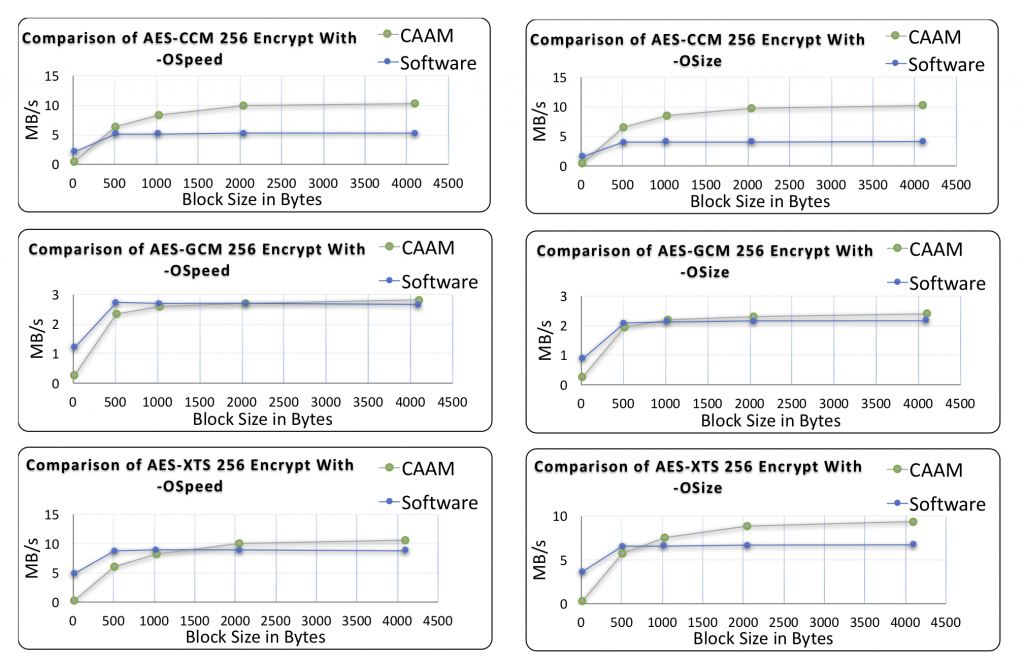
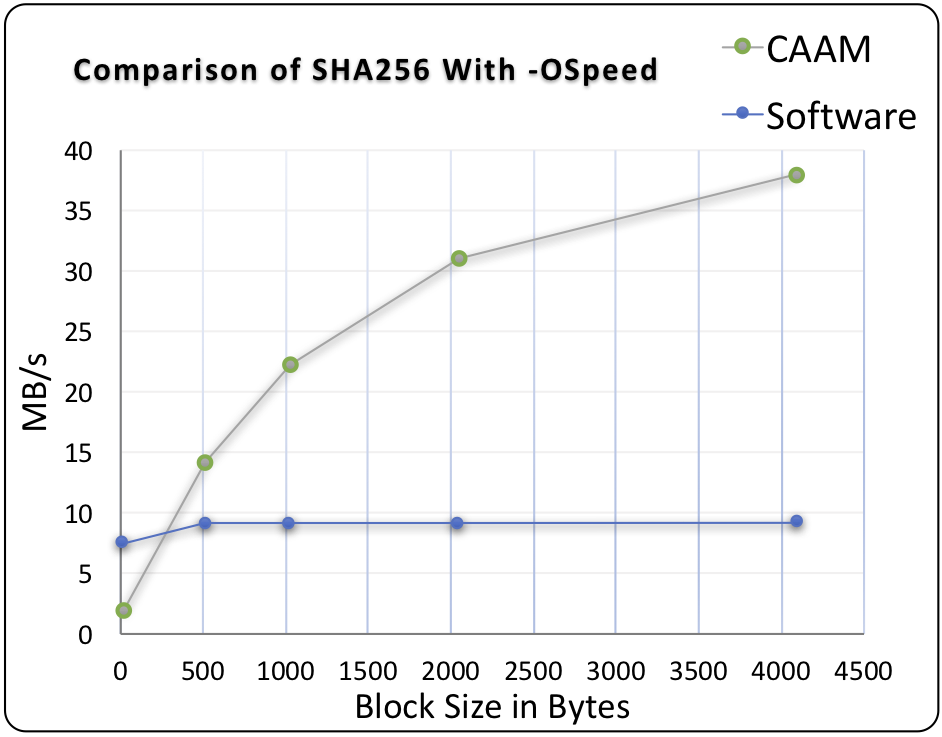
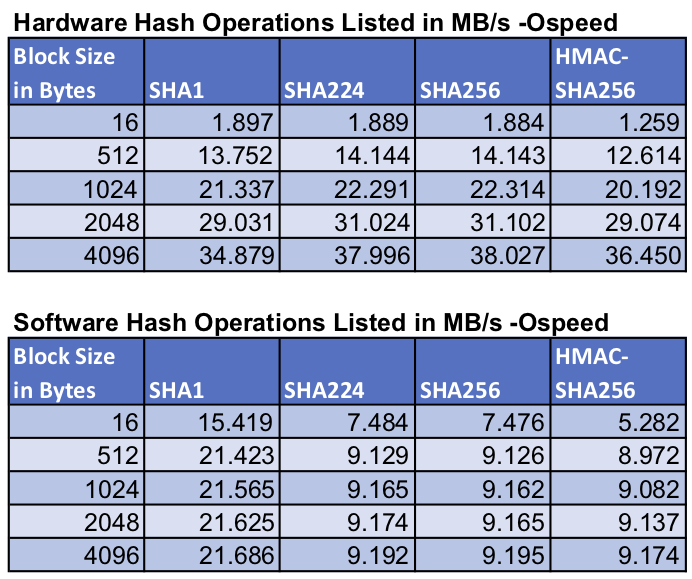
This benchmark data was collected for Green Hills INTEGRITY OS on an NXP i.MX6, running the wolfSSL benchmark application.
Return to top of page
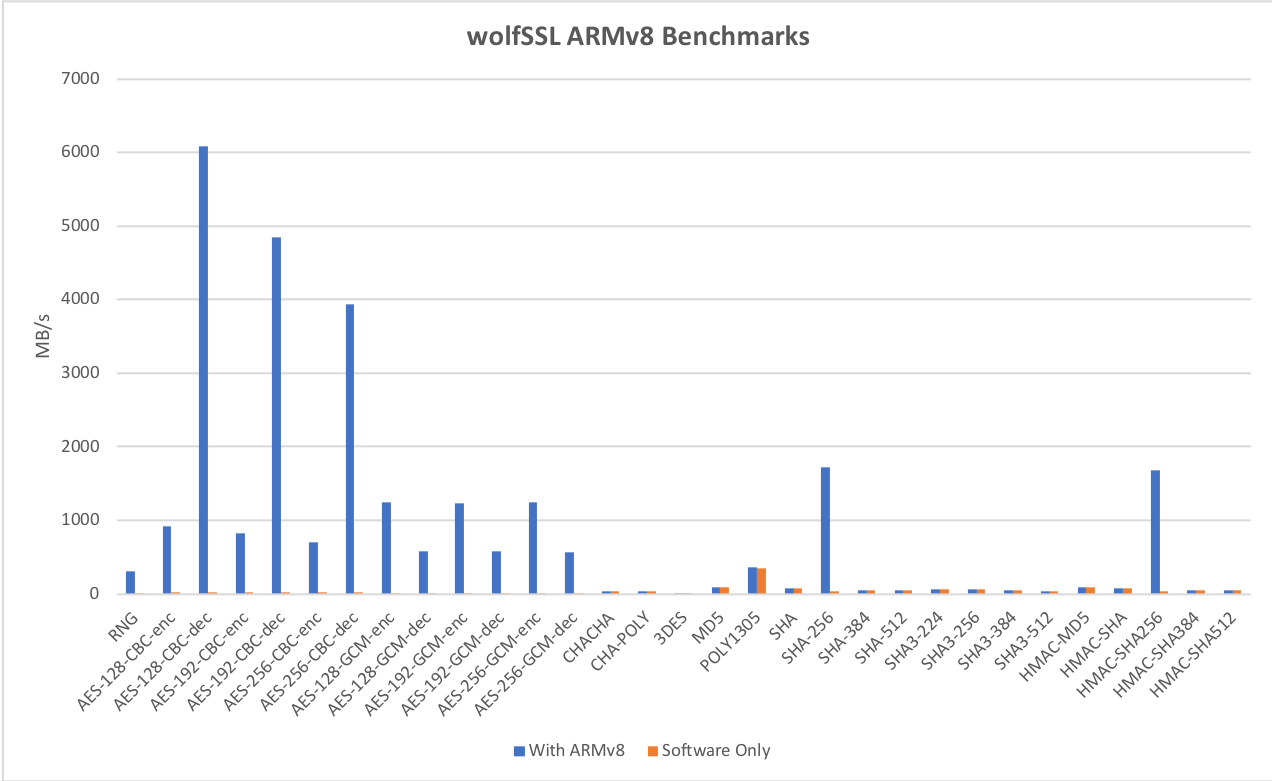
Benchmarks were collected using Apple’s iPhone X, which has their new A11 processor. These benchmarks use ARMv8 crypto extensions and single precision math to demonstrate performance.
For symmetric AES and SHA using our ARMv8 crypto assembly speedups we see
| Algorithm | Performance |
|---|---|
| AES-128 CBC Encrypt | 912.347 MB/s (36.58X) |
| AES-128 CBC Decrypt | 6,084.83 MB/s (256.15X) |
| AES-128 GCM Encrypt | 1,242.28 MB/s (193.65X) |
| AES-128 GCM Decrypt | 575.83 MB/s (90.26X) |
| SHA-256 | 1,717.28 MB/s (56.11X) |
This feature is enabled using `./configure –enable-armasm` or the `WOLFSSL_ARMASM` define.
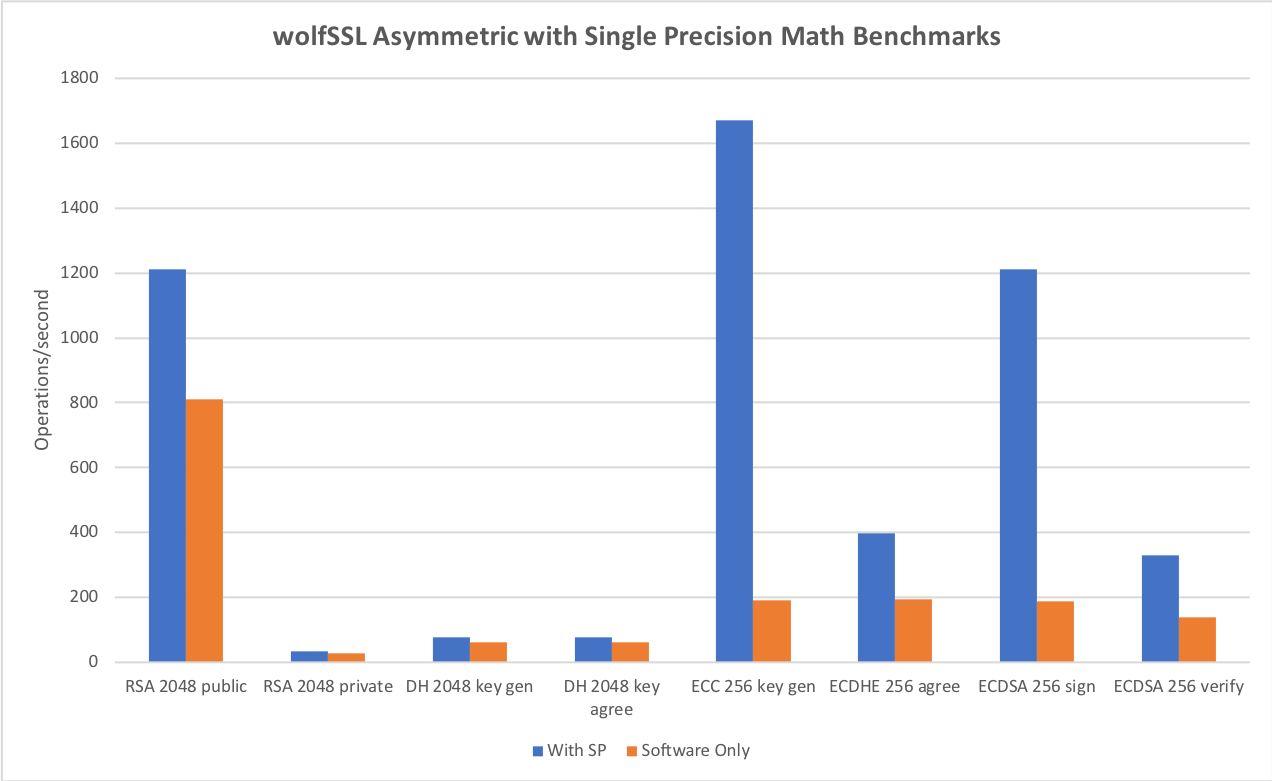
For asymmetric RSA, DH and ECC using our single precision math speedups we see
| Algorithm | Performance |
|---|---|
| RSA 2048 public | 1,211.27 ops/sec (1.50X) |
| RSA 2048 private | 32.59 ops/sec (1.18X) |
| DH 2048 key gen | 77.44 ops/sec (1.24X) |
| DH 2048 key agree | 77.45 ops/sec (1.29X) |
| ECC 256 key gen | 1670.65 ops/sec (8.67X) |
| ECDHE 256 agree | 396.88 ops/sec (2.05X) |
| ECDSA 256 sign | 1,212.33 ops/sec (6.42X) |
| ECDSA 256 verify | 331.02 ops/sec (2.38X) |
This feature is enabled using `./configure –enable-sp` or the `WOLFSSL_HAVE_SP_RSA`, `WOLFSSL_HAVE_SP_DH` and `WOLFSSL_HAVE_SP_ECC` defines.
For TLS v1.2 we see the following performance benchmarks by cipher suite
| Algorithm | Performance |
|---|---|
| DHE-RSA-AES128-SHA256 | CPS 22.5, Read 388 MB/s, Write 106 MB/s |
| ECDHE-RSA-AES128-GCM-SHA256 | CPS 26.2, Read 598 MB/s RX, Write 125 MB/s |
| ECDHE-ECDSA-AES128-GCM-SHA256 | CPS 83.4, Read 504.8 MB/s, Write 92.2 MB/s |
Benchmarks done on iPhone X using a single thread and our wolfCrypt and wolfSSL benchmark tools.
`X`= performance increase as compared to our default software based implementation.
`CPS` = Connections per second
Reference: wolfCrypt/wolfSSL Benchmarks with iPhone 8/8 Plus/X (A11) blog post
Return to top of page
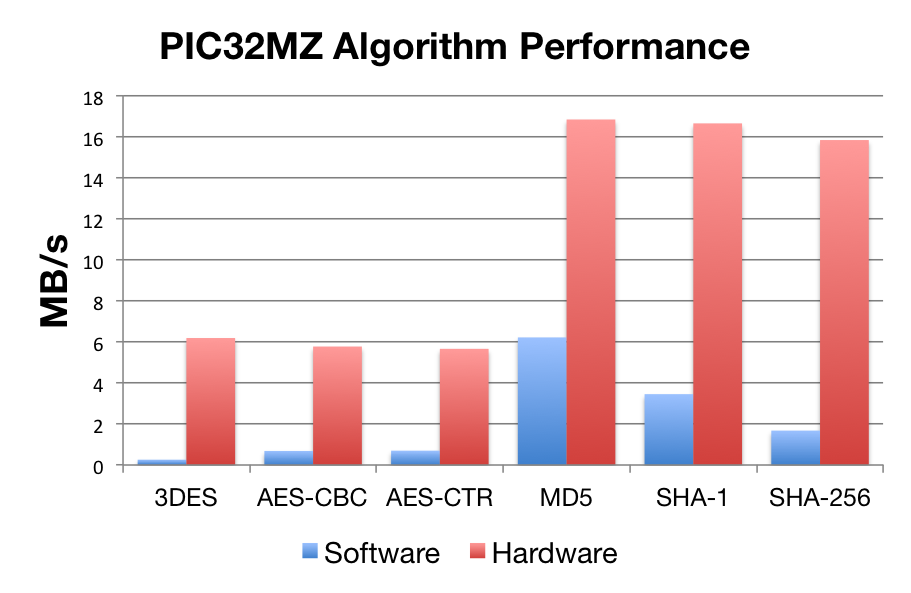
Benchmarks were collected using PIC32MZ Ethernet Starter Kit, using the wolfCrypt benchmark application and compiled with MPLAB X.
| Software Crypto | Hardware Crypto | |
| AES-CBC | 0.26 Mb/s | 5.78 Mb/s |
| AES-CTR | 0.69 Mb/s | 5.67 Mb/s |
| 3DES | 6.19 Mb/s | 6.19 Mb/s |
| MD5 | 6.22 Mb/s | 16.84 Mb/s |
| SHA-1 | 3.46 Mb/s | 16.65 Mb/s |
| SHA-256 | 1.678 Mb/s | 15.84 Mb/s |
Reference:
Return to top of page
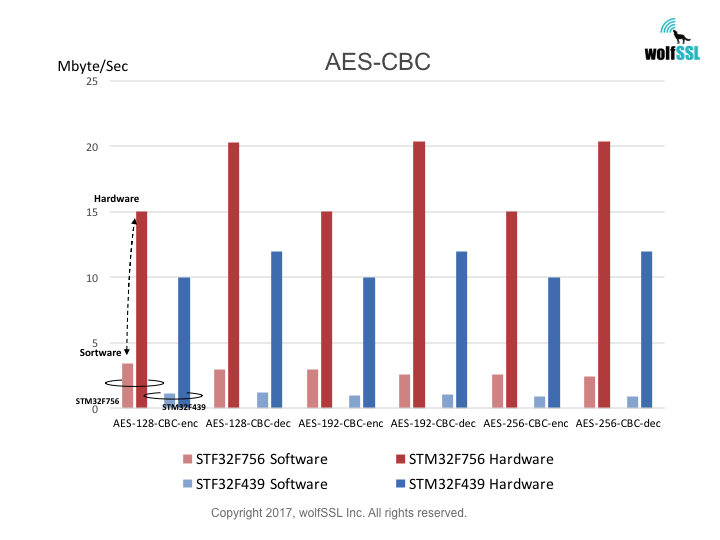
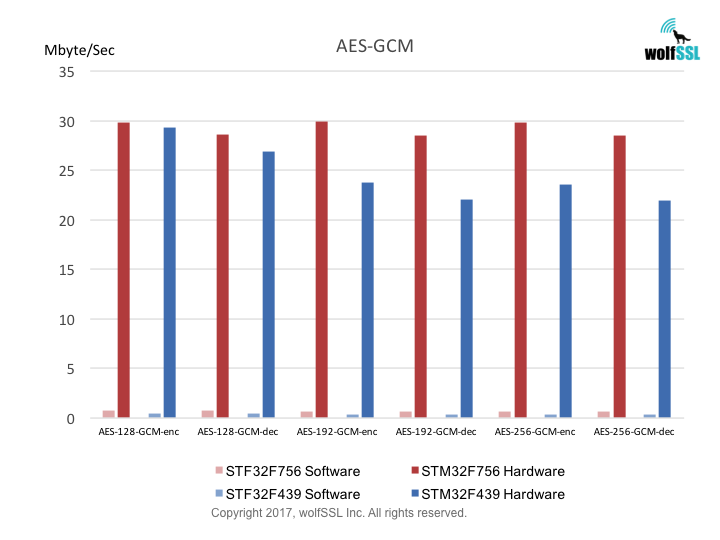
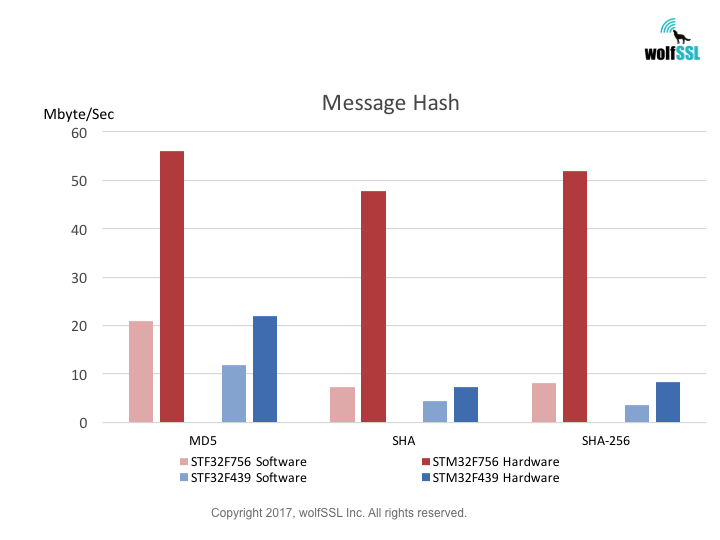
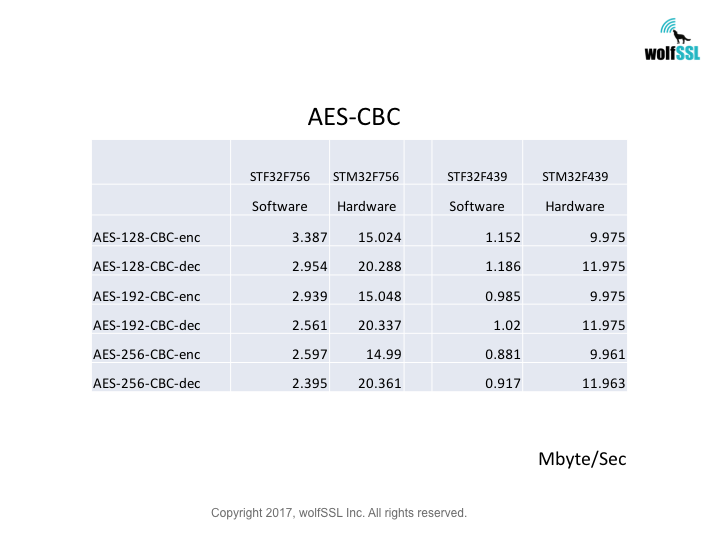
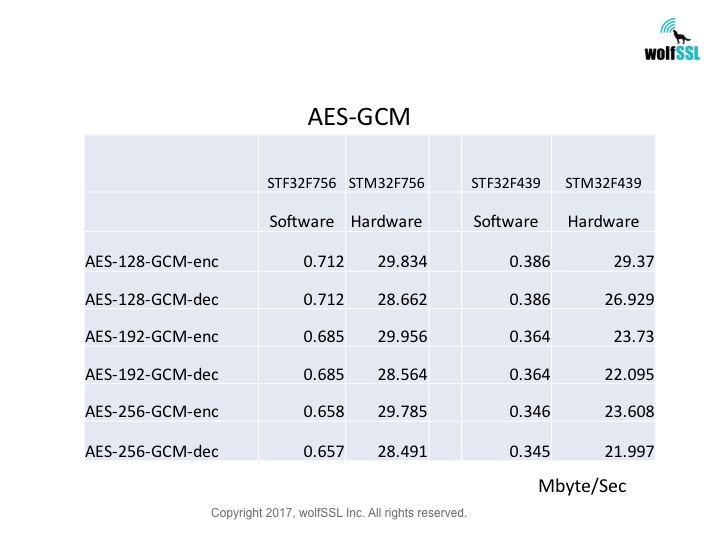
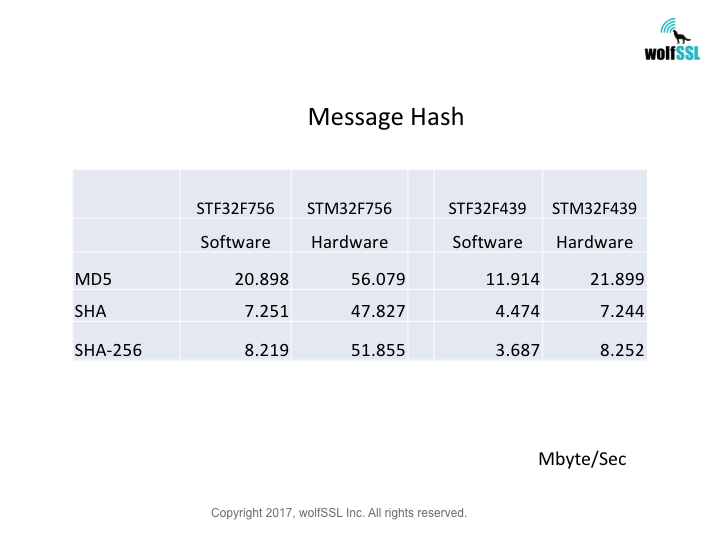
Benchmarks were collected using STMicroelectronics Evaluation Boards, using the wolfCrypt benchmark application and compiled with IAR EWARM (Optimization: High/Size).
Reference:
Return to top of page
Crypto Benchmarks:
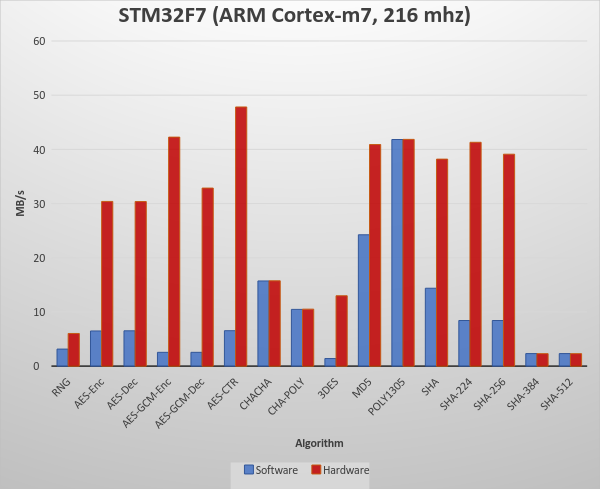
wolfSSL Software Crypto, Normal Big Integer Math Library
| RNG | 3 MB took 1.000 seconds | 3.149 MB/s |
| AES-Enc | 6 MB took 1.000 seconds | 6.494 MB/s |
| AES-Dec | 7 MB took 1.000 seconds | 6.519 MB/s |
| AES-GCM-Enc | 3 MB took 1.004 seconds | 553 MB/s |
| AES-GCM-Dec | 3 MB took 1.004 seconds | 2.553 MB/s |
| AES-CTR | 7 MB took 1.000 seconds | 6.543 MB/s |
| CHACHA | 16 MB took 1.000 seconds | 15.723 MB/s |
| CHA-POLY | 10 MB took 1.000 seconds | 10.474 MB/s |
| 3DES | 1 MB took 1.008 seconds | 1.405 MB/s |
| MD5 | 24 MB took 1.000 seconds | 24.243 MB/s |
| POLY1305 | 42 MB took 1.000 seconds | 41.821 MB/s |
| SHA | 14 MB took 1.000 seconds | 14.380 MB/s |
| SHA-224 | 8 MB took 1.000 seconds | 8.423 MB/s |
| SHA-256 | 8 MB took 1.000 seconds | 8.423 MB/s |
| SHA-384 | 2 MB took 1.000 seconds | 2.319 MB/s |
| SHA-512 | 2 MB took 1.000 seconds | 2.319 MB/s |
STM32F7 Hardware Crypto, Normal Big Integer Math Library
| RNG | 6 MB took 1.000 seconds | 6.030 MB/s |
| AES-Enc | 30 MB took 1.000 seconds | 30.396 MB/s |
| AES-Dec | 30 MB took 1.000 seconds | 30.371 MB/s |
| AES-GCM-Enc | 42 MB took 1.000 seconds | 42.261 MB/s |
| AES-GCM-Dec | 33 MB took 1.000 seconds | 32.861 MB/s |
| AES-CTR | 48 MB took 1.000 seconds | 47.827 MB/s |
| CHACHA | 16 MB took 1.000 seconds | 15.747 MB/s |
| CHA-POLY | 11 MB took 1.000 seconds | 10.522 MB/s |
| 3DES | 13 MB took 1.000 seconds | 12.988 MB/s |
| MD5 | 41 MB took 1.000 seconds | 40.894 MB/s |
| POLY1305 | 42 MB took 1.000 seconds | 41.846 MB/s |
| SHA | 38 MB took 1.004 seconds | 38.202 MB/s |
| SHA-224 | 41 MB took 1.000 seconds | 41.309 MB/s |
| SHA-256 | 39 MB took 1.000 seconds | 39.111 MB/s |
| SHA-384 | 2 MB took 1.004 seconds | 2.310 MB/s |
| SHA-512 | 2 MB took 1.004 seconds | 2.310 MB/s |
Reference:
wolfSSL and STM32F7
STM32F77NI
Return to top of page
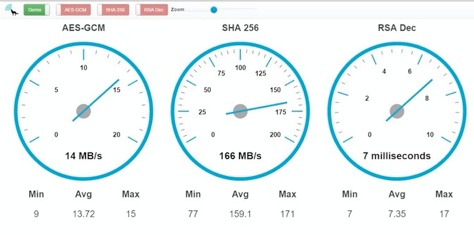
Below is the complete data from the benchmarks comparing hardware acceleration to normal software crypto:
| Algorithm | Software Cryptography | Hardware Cryptography |
|---|---|---|
| RNG | 16.761 MB/s | 82.599 MB/s |
| AES-128-CBC-enc | 26.491 MB/s | 649.179 MB/s |
| AES-128-CBC-dec | 26.915 MB/s | 607.407 MB/s |
| AES-192-CBC-enc | 22.796 MB/s | 566.717 MB/s |
| AES-192-CBC-dec | 23.130 MB/s | 553.092 MB/s |
| AES-256-CBC-enc | 20.004 MB/s | 504.143 MB/s |
| AES-256-CBC-dec | 20.207 MB/s | 491.374 MB/s |
| AES-128-GCM-enc | 6.224 MB/s | 393.407 MB/s |
| AES-128-GCM-dec | 6.226 MB/s | 182.279 MB/s |
| AES-192-GCM-enc | 5.895 MB/s | 361.801 MB/s |
| AES-192-GCM-dec | 5.895 MB/s | 175.676 MB/s |
| AES-256-GCM-enc | 5.609 MB/s | 333.911 MB/s |
| AES-256-GCM-dec | 5.610 MB/s | 169.085 MB/s |
| CHACHA | 60.510 MB/s | 60.017 MB/s |
| CHA-POLY | 41.805 MB/s | 41.410 MB/s |
| MD5 | 156.310 MB/s | 154.421 MB/s |
| POLY1305 | 144.464 MB/s | 143.058 MB/s |
| SHA | 89.874 MB/s | 89.154 MB/s |
| SHA-256 | 38.805 MB/s | 533.139 MB/s |
| HMAC-MD5 | 156.301 MB/s | 154.083 MB/s |
| HMAC-SHA | 89.859 MB/s | 89.045 MB/s |
| HMAC-SHA256 | 38.814 MB/s | 532.316 MB/s |
| RSA, 2048, public | 171.995 Ops/s | 171.355 Ops/s |
| RSA, 2048, private | 13.716 Ops/s | 13.686 Ops/s |
| DH, 2048, key generation | 50.831 Ops/s | 50.575 Ops/s |
| DH, 2048, agree | 41.826 Ops/s | 41.596 Ops/s |
Return to top of page

 Return to top of page
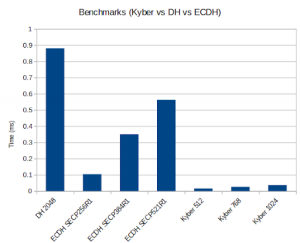
Post-Quantum Kyber Benchmarks (Linux)
Platform:
11th Gen Intel® Core™ i7-1185G7 @ 3.00GHz × 8
Benchmark:
Notes:
- – Only 1 core is used
- – Conventional algorithms are present for comparison purposes
- – The wolfSSL configuration used was:
./configure --disable-psk --disable-shared --enable-intelasm
 --enable-aesni --enable-sp --enable-sp-math --enable-sp-asm
 --enable-kyber=wolfssl,all 'CFLAGS=-Os -DECC_USER_CURVES -DHAVE_ECC256
 -DHAVE_ECC384'
wolfSSL Server Benchmark on TLS13-AES256-GCM-SHA384 with group ECC_SECP384R1:
Total   	:   5505024 bytes
    	Num Conns   :    	22
    	Rx Total	:   953.534 ms
    	Tx Total	: 	6.757 ms
    	Rx      	: 	2.753 MB/s
    	Tx      	:   388.471 MB/s
    	Connect 	:	55.076 ms
    	Connect Avg : 	2.503 ms
wolfSSL Client Benchmark on TLS13-AES256-GCM-SHA384 with group ECC_SECP384R1:
Total   	:   5505024 bytes
    	Num Conns   :    	22
    	Rx Total	:   956.304 ms
    	Tx Total	: 	5.627 ms
    	Rx      	: 	2.745 MB/s
    	Tx      	:   466.488 MB/s
    	Connect 	:	54.827 ms
    	Connect Avg : 	2.492 ms
wolfSSL Server Benchmark on TLS13-AES256-GCM-SHA384 with group ECC_SECP521R1:
Total   	:   5505024 bytes
    	Num Conns   :    	22
    	Rx Total	:   948.864 ms
    	Tx Total	: 	6.542 ms
    	Rx      	: 	2.766 MB/s
    	Tx      	:   401.226 MB/s
    	Connect 	:	59.490 ms
    	Connect Avg : 	2.704 ms
wolfSSL Client Benchmark on TLS13-AES256-GCM-SHA384 with group ECC_SECP521R1:
Total   	:   5505024 bytes
    	Num Conns   :    	22
    	Rx Total	:   951.101 ms
    	Tx Total	: 	5.791 ms
    	Rx      	: 	2.760 MB/s
    	Tx      	:   453.275 MB/s
    	Connect 	:	59.598 ms
    	Connect Avg : 	2.709 ms
wolfSSL Server Benchmark on TLS13-AES256-GCM-SHA384 with group KYBER_LEVEL1:
Total   	:   5505024 bytes
    	Num Conns   :    	22
    	Rx Total	:   954.452 ms
    	Tx Total	: 	7.089 ms
    	Rx      	: 	2.750 MB/s
    	Tx      	:   370.297 MB/s
    	Connect 	:	47.349 ms
    	Connect Avg : 	2.152 ms
wolfSSL Client Benchmark on TLS13-AES256-GCM-SHA384 with group KYBER_LEVEL1:
Total   	:   5505024 bytes
    	Num Conns   :    	22
    	Rx Total	:   956.931 ms
    	Tx Total	: 	6.189 ms
    	Rx      	: 	2.743 MB/s
    	Tx      	:   424.149 MB/s
    	Connect 	:	46.129 ms
    	Connect Avg : 	2.097 ms
wolfSSL Server Benchmark on TLS13-AES256-GCM-SHA384 with group KYBER_LEVEL3:
Total   	:   5767168 bytes
    	Num Conns   :    	23
    	Rx Total	:   958.702 ms
    	Tx Total	: 	7.431 ms
    	Rx      	: 	2.868 MB/s
    	Tx      	:   370.070 MB/s
    	Connect 	:	48.699 ms
    	Connect Avg : 	2.117 ms
wolfSSL Client Benchmark on TLS13-AES256-GCM-SHA384 with group KYBER_LEVEL3:
Total   	:   5767168 bytes
    	Num Conns   :    	23
    	Rx Total	:   961.281 ms
    	Tx Total	: 	6.032 ms
    	Rx      	: 	2.861 MB/s
    	Tx      	:   455.903 MB/s
    	Connect 	:	47.497 ms
    	Connect Avg : 	2.065 ms
wolfSSL Server Benchmark on TLS13-AES256-GCM-SHA384 with group KYBER_LEVEL5:
Total   	:   5767168 bytes
    	Num Conns   :    	23
    	Rx Total	:   967.680 ms
    	Tx Total	: 	6.709 ms
    	Rx      	: 	2.842 MB/s
    	Tx      	:   409.906 MB/s
    	Connect 	:	51.945 ms
    	Connect Avg : 	2.258 ms
wolfSSL Client Benchmark on TLS13-AES256-GCM-SHA384 with group KYBER_LEVEL5:
Total   	:   5767168 bytes
    	Num Conns   :    	23
    	Rx Total	:   969.719 ms
    	Tx Total	: 	6.183 ms
    	Rx      	: 	2.836 MB/s
    	Tx      	:   444.774 MB/s
    	Connect 	:	49.456 ms
    	Connect Avg : 	2.150 ms
wolfSSL Server Benchmark on TLS13-AES256-GCM-SHA384 with group P256_KYBER_LEVEL1:
Total   	:   2883584 bytes
    	Num Conns   :    	12
    	Rx Total	:   494.597 ms
    	Tx Total	: 	2.225 ms
    	Rx      	: 	2.780 MB/s
    	Tx      	:   618.065 MB/s
    	Connect 	:   540.056 ms
    	Connect Avg :	45.005 ms
wolfSSL Client Benchmark on TLS13-AES256-GCM-SHA384 with group P256_KYBER_LEVEL1:
Total   	:   2883584 bytes
    	Num Conns   :    	12
    	Rx Total	:   495.337 ms
    	Tx Total	: 	2.282 ms
    	Rx      	: 	2.776 MB/s
    	Tx      	:   602.567 MB/s
    	Connect 	:   538.472 ms
    	Connect Avg :	44.873 ms
wolfSSL Server Benchmark on TLS13-AES256-GCM-SHA384 with group P384_KYBER_LEVEL3:
Total   	:   2883584 bytes
    	Num Conns   :    	12
    	Rx Total	:   503.707 ms
    	Tx Total	: 	3.427 ms
    	Rx      	: 	2.730 MB/s
    	Tx      	:   401.222 MB/s
    	Connect 	:   526.276 ms
    	Connect Avg :	43.856 ms
wolfSSL Client Benchmark on TLS13-AES256-GCM-SHA384 with group P384_KYBER_LEVEL3:
Total   	:   2883584 bytes
    	Num Conns   :    	12
    	Rx Total	:   505.002 ms
    	Tx Total	: 	3.302 ms
    	Rx      	: 	2.723 MB/s
    	Tx      	:   416.462 MB/s
    	Connect 	:   523.324 ms
    	Connect Avg :	43.610 ms
wolfSSL Server Benchmark on TLS13-AES256-GCM-SHA384 with group P521_KYBER_LEVEL5:
Total   	:   2883584 bytes
    	Num Conns   :    	12
    	Rx Total	:   503.258 ms
    	Tx Total	: 	3.171 ms
    	Rx      	: 	2.732 MB/s
    	Tx      	:   433.556 MB/s
    	Connect 	:   537.391 ms
    	Connect Avg :	44.783 ms
wolfSSL Client Benchmark on TLS13-AES256-GCM-SHA384 with group P521_KYBER_LEVEL5:
Total   	:   2883584 bytes
    	Num Conns   :    	12
    	Rx Total	:   504.367 ms
    	Tx Total	: 	3.316 ms
    	Rx      	: 	2.726 MB/s
    	Tx      	:   414.636 MB/s
    	Connect 	:   532.820 ms
    	Connect Avg :	44.402 ms
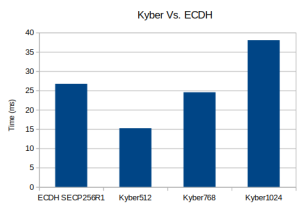
Post-Quantum Kyber Benchmarks (ARM Cortex-M4)
Platform:
STM NUCLEO-F446ZE
Benchmark:
Notes:
- – The HCLK in the project was set to 168MHz
- – Only 1 core used
– wolfSSL Math Configuration set to “Single Precision ASM Cortex-M3+ Math”
– Optimization flag: -Ofast
– Conventional algorithms are present for comparison purposes
RSA    	    2048 	public    82 ops took 1.020 sec, avg 12.439 ms, 80.392 ops/sec
RSA    	    2048 	private   4 ops took 1.827 sec, avg 456.750 ms, 2.189 ops/sec
DH     	    2048 	key gen   5 ops took 1.181 sec, avg 236.200 ms, 4.234 ops/sec
DH     	    2048 	agree     6 ops took 1.419 sec, avg 236.500 ms, 4.228 ops/sec
ECC   SECP256R1 	key gen   118 ops took 1.012 sec, avg 8.576 ms, 116.601 ops/sec
ECDHE SECP256R1 	agree     56 ops took 1.016 sec, avg 18.143 ms, 55.118 ops/sec
KYBER512    128 	key gen   232 ops took 1.004 sec, avg 4.328 ms, 231.076 ops/sec
KYBER512    128 	encap     192 ops took 1.008 sec, avg 5.250 ms, 190.476 ops/sec
KYBER512    128 	decap     178 ops took 1.004 sec, avg 5.640 ms, 177.291 ops/sec
KYBER768    192 	key gen   146 ops took 1.008 sec, avg 6.904 ms, 144.841 ops/sec
KYBER768    192 	encap     118 ops took 1.008 sec, avg 8.542 ms, 117.063 ops/sec
KYBER768    192 	decap     110 ops took 1.000 sec, avg 9.091 ms, 110.000 ops/sec
KYBER1024   256 	key gen   92 ops took 1.011 sec, avg 10.989 ms, 90.999 ops/sec
KYBER1024   256 	encap     76 ops took 1.000 sec, avg 13.158 ms, 76.000 ops/sec
KYBER1024   256 	decap     72 ops took 1.000 sec, avg 13.889 ms, 72.000 ops/sec
Post-Quantum Kyber Benchmarks (MacOS)
Platform:
Apple MacBook Pro 18,3 with an Apple M1 Pro, 3.09 GHz processor
Benchmark:
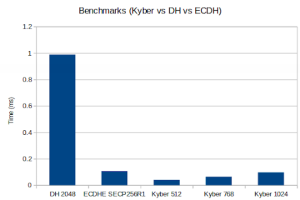
Notes:
- – Only 1 core is used
Math: 	Multi-Precision: Wolf(SP) no-dyn-stack word-size=64 bits=4096 sp_int.c
	Single Precision: ecc 256 384 521 rsa/dh 2048 3072 4096 asm sp_arm64.c


wolfCrypt Benchmark (block bytes 1048576, min 1.0 sec each)

DH      2048  key gen      3997 ops took 1.000 sec, avg 0.250 ms, 3996.812 ops/sec
DH      2048    agree      4100 ops took 1.001 sec, avg 0.244 ms, 4097.522 ops/sec
KYBER512    128  key gen     96100 ops took 1.001 sec, avg 0.010 ms, 96037.765 ops/sec
KYBER512    128    encap     78000 ops took 1.000 sec, avg 0.013 ms, 77970.220 ops/sec
KYBER512    128    decap     58900 ops took 1.001 sec, avg 0.017 ms, 58867.158 ops/sec
KYBER768    192  key gen     58200 ops took 1.000 sec, avg 0.017 ms, 58192.314 ops/sec
KYBER768    192    encap     48700 ops took 1.001 sec, avg 0.021 ms, 48664.334 ops/sec
KYBER768    192    decap     38100 ops took 1.001 sec, avg 0.026 ms, 38059.656 ops/sec
KYBER1024   256  key gen     37800 ops took 1.003 sec, avg 0.027 ms, 37704.299 ops/sec
KYBER1024   256    encap     32600 ops took 1.001 sec, avg 0.031 ms, 32566.427 ops/sec
KYBER1024   256    decap     26000 ops took 1.001 sec, avg 0.039 ms, 25967.020 ops/sec
ECC   [      SECP256R1]   256  key gen     84100 ops took 1.001 sec, avg 0.012 ms, 84013.469 ops/sec
ECDHE [      SECP256R1]   256    agree     24400 ops took 1.004 sec, avg 0.041 ms, 24300.995 ops/sec